Appearance

Summary: A reproducible benchmark comparing two ways of running DuckDB against Azure Blob Storage: the native azure extension (az://) versus fronting the same storage account with a properly tuned s3proxy and using httpfs (s3://). Results across four data sizes (5k → 2M rows) show that the s3proxy path wins clearly for the DuckLake-relevant patterns we care about most: partitioned writes, warm reopens, and larger cold scans. The main exception is selective reads with predicate pushdown, where direct Azure wins. A later rerun at 4M rows also showed a crossover where direct Azure became faster for one very large single-file write.
DuckDB on Azure: direct az:// vs S3-compatible proxy
TL;DR — When using DuckDB against Azure Blob Storage, fronting your Azure account with a properly tuned s3proxy (using the
azureblob-sdkjclouds backend) remains the better path for the DuckLake-style workload we care about most: partitioned writes, repeated warm reads, and larger cold scans. The biggest and most stable win is still warm reopens (30–200× in the original benchmark). The main exception is selective reads with predicate pushdown, where direct Azure wins, and a later rerun at 4M rows showed that directaz://can also overtake s3proxy for a single very large parquet write.
Table of contents
Why benchmark this at all?
We run a Dagster + DuckDB/DuckLake stack at the Fédération Wallonie-Bruxelles (CFWB) and our underlying object storage is Azure Blob. DuckDB has one official way to talk to Azure — the azure extension, which uses az:// URLs. But it also has a generic S3-compatible extension (httpfs) that can talk to any S3-compatible gateway, including s3proxy. So we have two options for how to connect DuckDB to Azure:
- Direct, via the official
azureextension (az://container/...URLs) - Through an S3-compatible gateway, via the
httpfsextension (s3://bucket/...URLs pointing at a local s3proxy that translates calls to Azure)
The same physical storage backend, two very different code paths inside DuckDB. We had a vague feeling that performance was uneven, so we built a reproducible benchmark to find out exactly where the differences are.
The setup
- Same Azure storage account behind both paths (so we're not measuring geography)
- DuckDB 1.5.1 with the
httpfsandazureextensions - s3proxy running locally in Docker, talking to Azure
- A small SQL script that:
- Generates a synthetic table in memory
- Writes it as parquet (single file + partitioned) to both backends
- Reads it back (cold, warm, selective filter, glob)
- Times every step with
.timer on
We ran the same script across four data sizes: 5k, 50k, 500k, and 2M rows — to see how the per-request overhead amortizes as files grow.
Update on 2026-04-10: I reran the benchmark locally with the same Azure account and the same ducklake-test container, extending it to 4M rows. That rerun did not change the main DuckLake conclusion, but it did reveal one important nuance: for a single large parquet write, direct az:// overtook s3proxy at 4M rows. Partitioned writes, warm reads, and cold reads still favored s3proxy in that rerun.
We also tuned s3proxy in two iterations:
- Pool tuning: bigger jclouds connection pool, OkHttp client, JVM heap.
- Backend swap: from the legacy
azureblobjclouds provider to the modernazureblob-sdk(uses the official Azure Java SDK with Netty under the hood).
The big picture
Before diving into individual charts, here is the whole story in a single heatmap. Each cell shows how much faster s3proxy is than direct Azure for one operation at one data size. Blue cells mean s3proxy wins, red cells mean direct Azure wins.
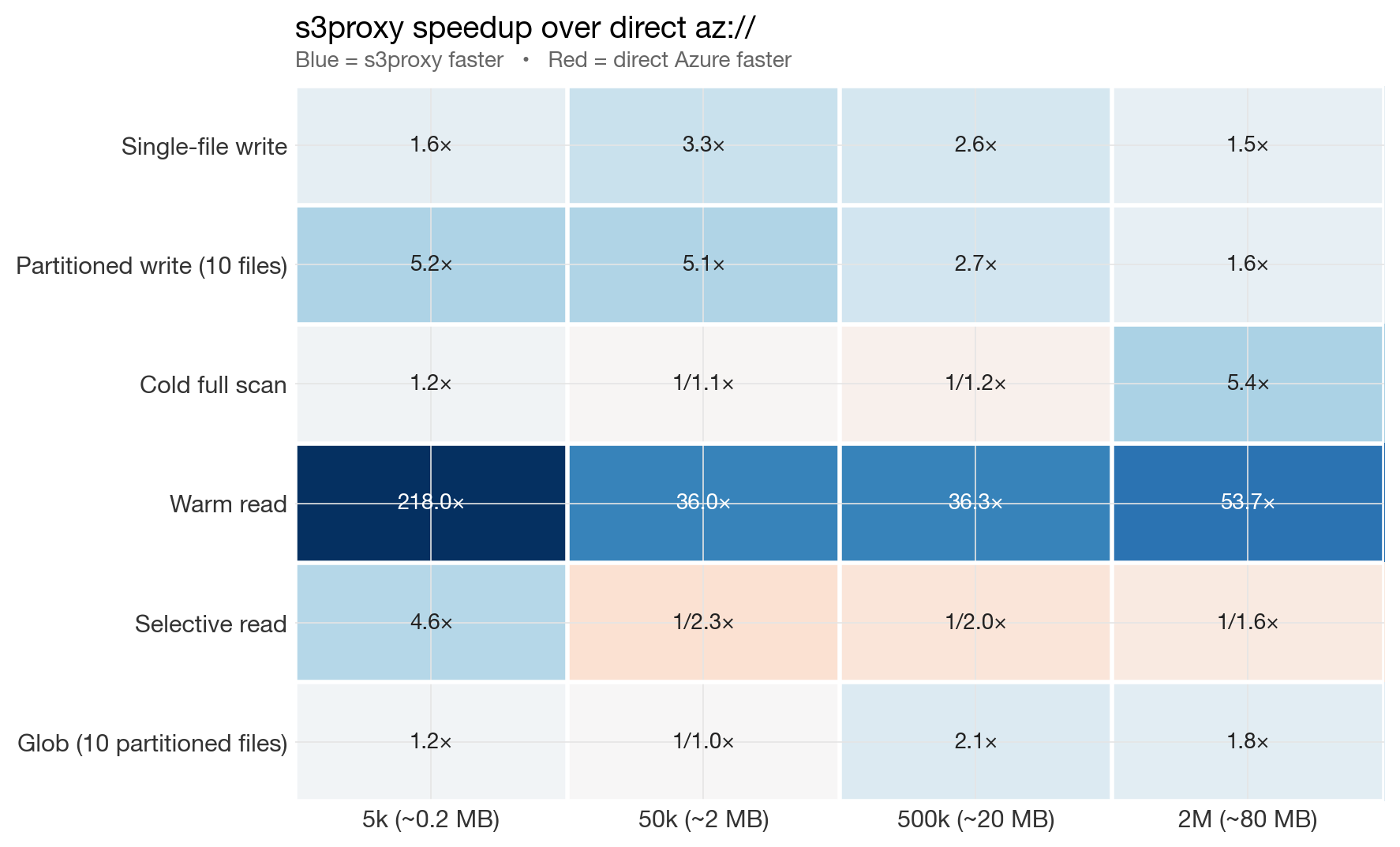
Summary heatmap: s3proxy speedup over direct az://
Blue dominates in the original 5k → 2M benchmark. The one consistently red row is "Selective read" — a genuine strength of the azure extension's range-request path. A later 4M rerun added one more red cell: single-file write.
Results, operation by operation
All numbers below are from a slow home connection with the tuned azureblob-sdk s3proxy backend.
Single-file parquet writes
Single-file write benchmark
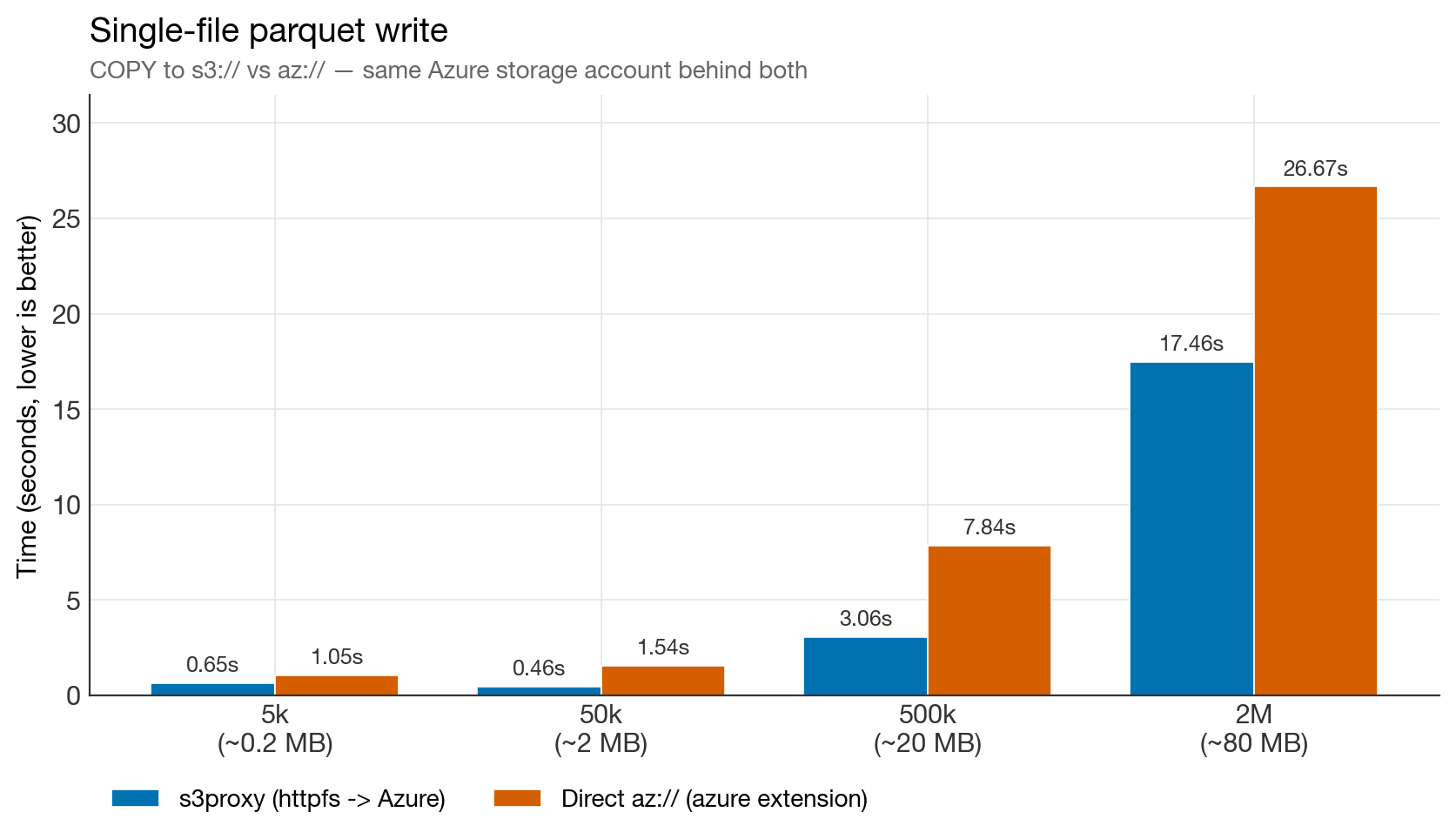
s3proxy wins at every size in the original 5k → 2M benchmark by 1.5–3×. At 2M rows (80 MB parquet), direct Azure takes 26.7 s versus 17.5 s for s3proxy.
Update from the 2026-04-10 rerun: at 4M rows, this pattern flipped. In that run, single-file write was 72.0 s via s3proxy versus 55.7 s via direct az://. So the more precise statement is: s3proxy wins single-file writes up through the original benchmark range, but there appears to be a crossover somewhere between 2M and 4M rows where direct Azure can become faster.
Partitioned writes (10 files)
Partitioned write benchmark
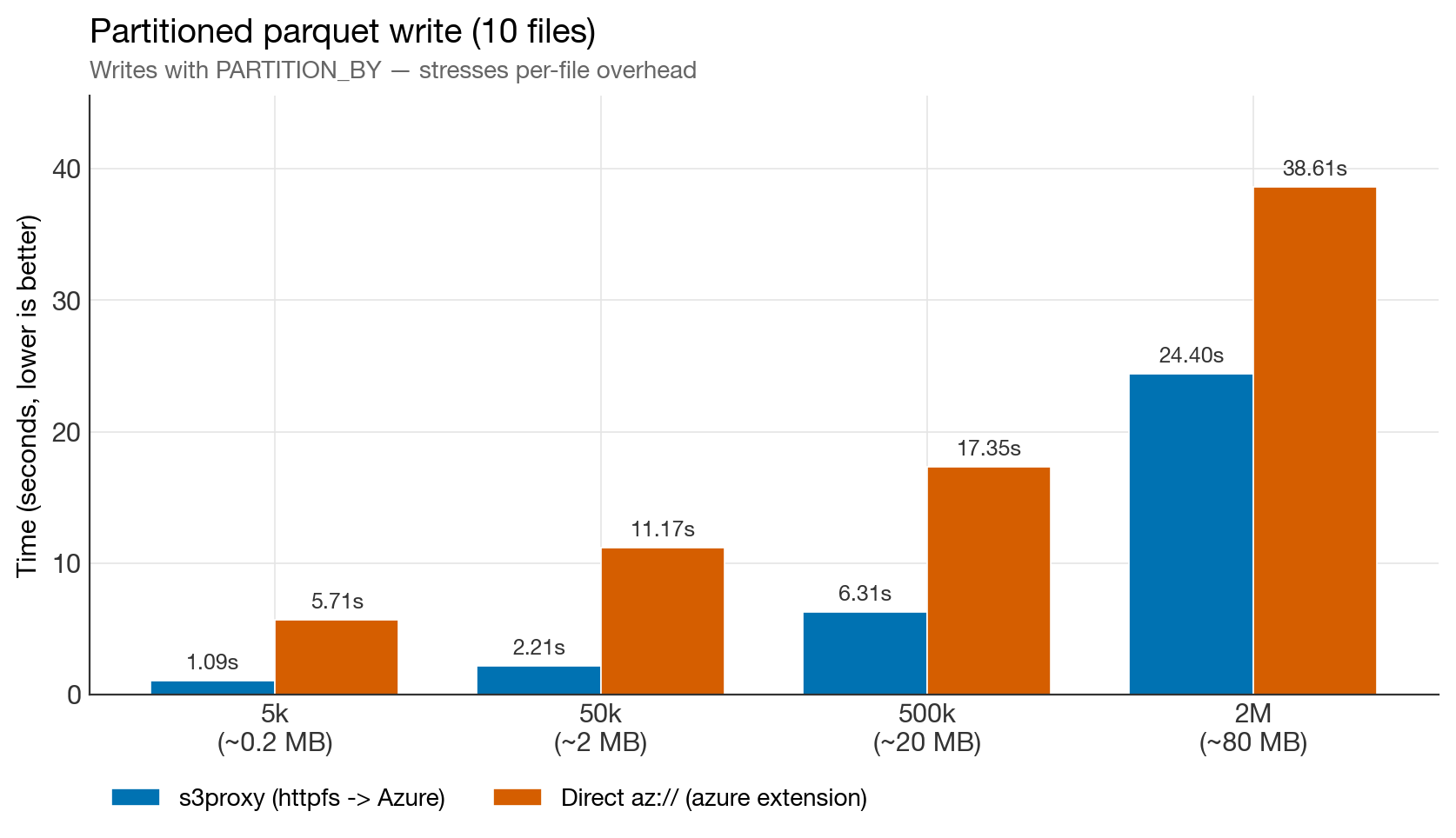
The most dramatic result. At 5k rows, s3proxy is 5× faster. Even at 2M rows it stays 1.6× faster. The gap on the Azure side is almost pure in-process CPU burn — see the "CPU problem" observation below.
Cold full scan
Cold full scan benchmark
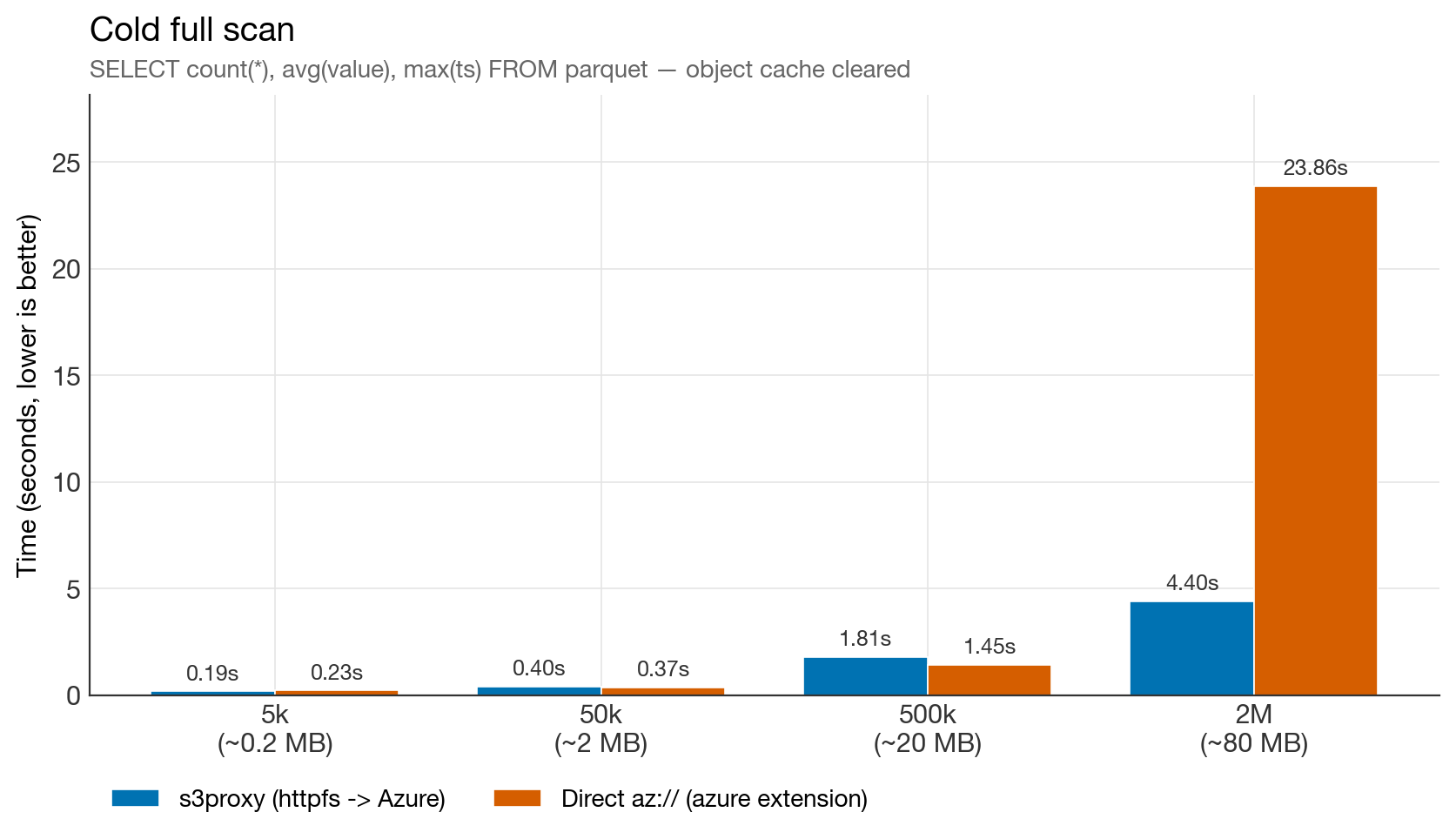
Near-tie up to 500k rows. Then, at 2M rows, direct Azure collapses to 23.9 s — 5× slower than s3proxy for reading the exact same parquet file. This was the most surprising finding of the whole benchmark, and it's reproducible.
Warm read (log scale)
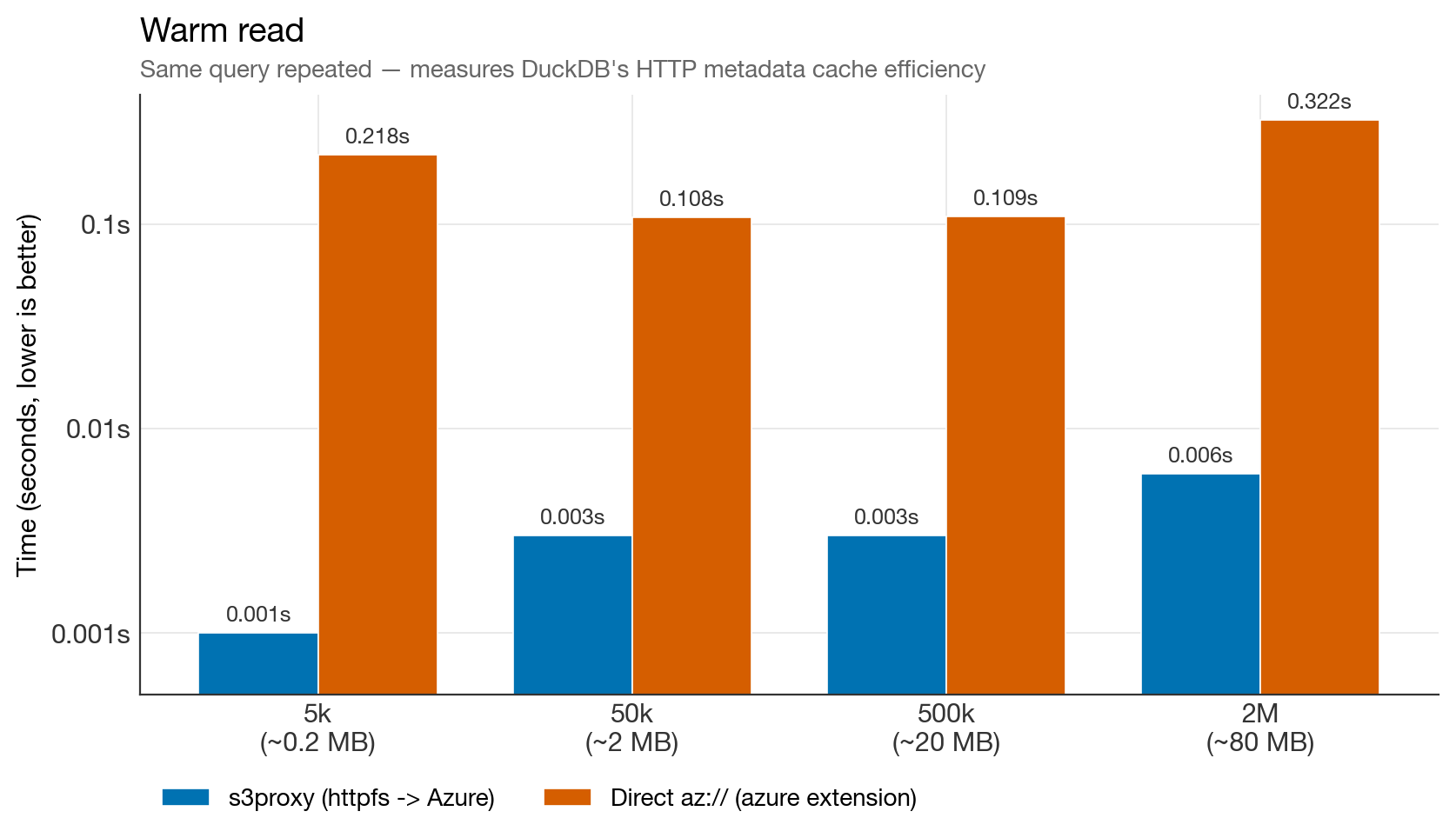
Warm read benchmark (log scale)
30–200× faster warm reads on s3proxy. On httpfs, DuckDB caches parquet footers and row-group metadata in memory and reuses them on subsequent queries. The azure extension does not engage that cache — every open re-fetches metadata over the wire. For DuckLake workloads, which re-open the same files constantly, this is the single most important finding.
Selective read with predicate pushdown
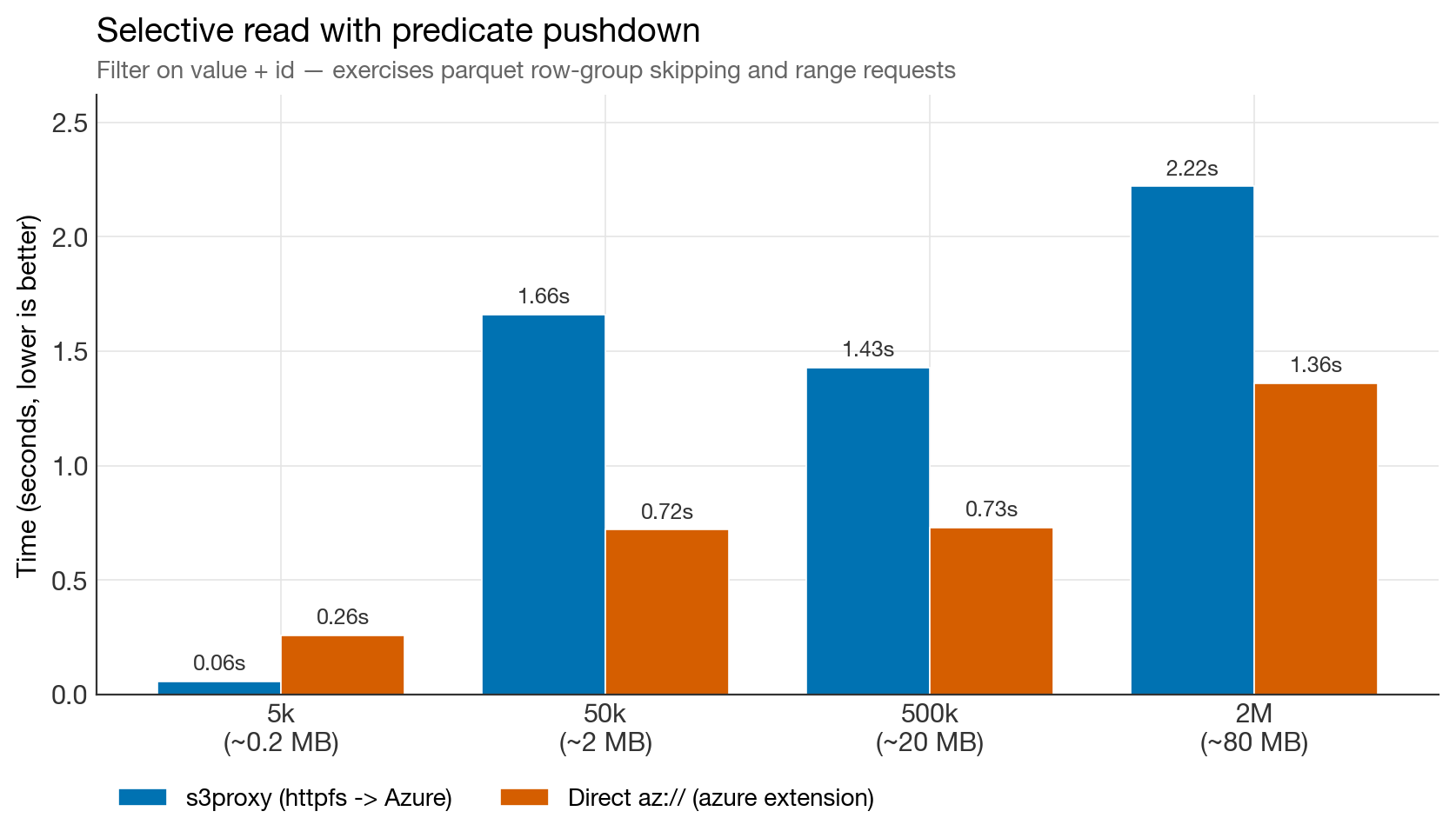
Selective read benchmark
The one chart where direct Azure wins consistently in the original benchmark. The azure extension batches range requests more aggressively than httpfs-through-s3proxy. If your workload is dominated by big parquet files with predicate pushdown — the classic OLAP fact-table pattern — this matters.
Glob over a partitioned dataset
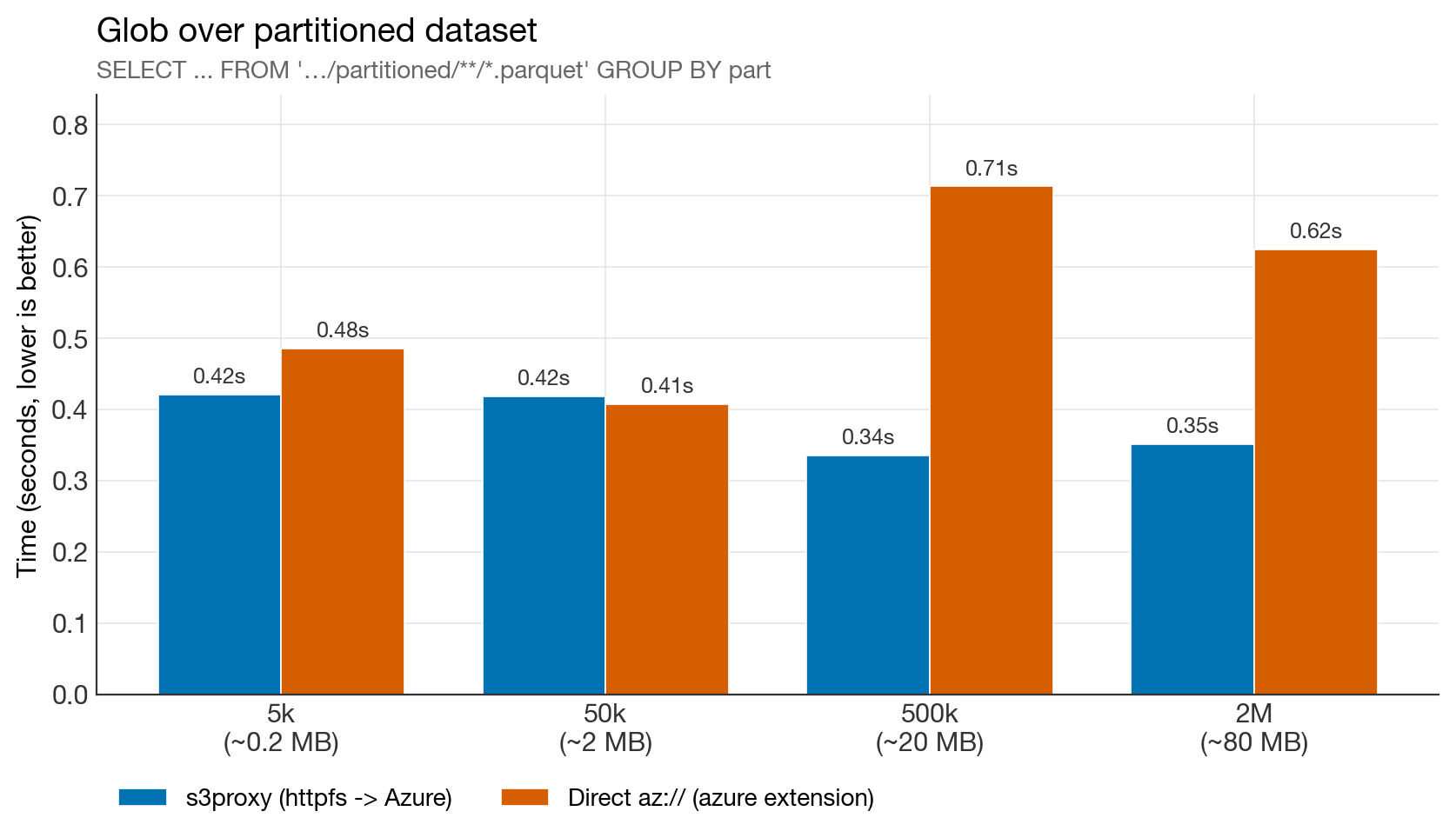
Glob benchmark
Tie at small sizes; s3proxy wins by ~2× on larger data. DuckLake never globs (the catalog already has the file list), so this column is informational only, but it's worth noting that the tuned s3proxy is no longer at a disadvantage for LIST-heavy operations.
Full results table
| Step | 5k (~0.2 MB) | 50k (~2 MB) | 500k (~20 MB) | 2M (~80 MB) |
|---|---|---|---|---|
| s3proxy / az:// | s3proxy / az:// | s3proxy / az:// | s3proxy / az:// | |
| WRITE single file | 0.65 / 1.05 | 0.46 / 1.54 | 3.06 / 7.84 | 17.5 / 26.7 |
| WRITE 10 partitions | 1.09 / 5.71 | 2.21 / 11.17 | 6.31 / 17.3 | 24.4 / 38.6 |
| READ cold (full scan) | 0.19 / 0.23 | 0.40 / 0.37 | 1.81 / 1.45 | 4.40 / 23.9 |
| READ warm | 0.001 / 0.22 | 0.003 / 0.11 | 0.003 / 0.11 | 0.006 / 0.32 |
| READ selective | 0.06 / 0.26 | 1.66 / 0.72 | 1.43 / 0.73 | 2.22 / 1.36 |
| READ glob (10 files) | 0.42 / 0.49 | 0.42 / 0.41 | 0.34 / 0.71 | 0.35 / 0.62 |
Config: DuckDB 1.5.1 + s3proxy with
azureblob-sdkbackend, tuned jclouds pool (200 connections), OkHttp client, same Azure storage account behind both paths.
Five things we learned
1. The default s3proxy config is the bottleneck, not s3proxy itself
Our first run with the default andrewgaul/s3proxy:latest config showed s3proxy losing badly on partitioned writes and selective reads. After tuning the jclouds pool and switching to azureblob-sdk, write times dropped 7× and read latency improved across the board.
The settings:
docker-compose.yml snippet:
yaml
services:
  s3proxy:
    image: andrewgaul/s3proxy:latest
    container_name: s3proxy
    restart: unless-stopped
    ports:
      - "8080:80"
    environment:
      S3PROXY_ENDPOINT: http://0.0.0.0:80
      S3PROXY_AUTHORIZATION: aws-v2-or-v4
      S3PROXY_IDENTITY: ${S3PROXY_IDENTITY}
      S3PROXY_CREDENTIAL: ${S3PROXY_CREDENTIAL}
      S3PROXY_VIRTUALHOST: ""
      JCLOUDS_PROVIDER: azureblob-sdk
      JCLOUDS_IDENTITY: ${AZURE_STORAGE_ACCOUNT}
      JCLOUDS_CREDENTIAL: ${AZURE_STORAGE_KEY}
      JCLOUDS_ENDPOINT: https://${AZURE_STORAGE_ACCOUNT}.blob.core.windows.net
      # --- HTTP / connection pooling tuning ---
      # Default jclouds pool is tiny (~20) and kills parallel range-GET perf.
      JCLOUDS_PROPERTY_jclouds.max-connections-per-context: "200"
      JCLOUDS_PROPERTY_jclouds.max-connections-per-host: "100"
      JCLOUDS_PROPERTY_jclouds.user-threads: "50"
      # --- JVM tuning for the s3proxy process ---
      JAVA_TOOL_OPTIONS: >-
        -Xmx1g
        -XX:+UseG1GC
        -Dhttp.maxConnections=200
        -Dhttp.keepAlive=true
The default azureblob jclouds backend is officially deprecated and uses the legacy HTTP client with a tiny ~20-connection pool. Anyone running s3proxy in front of Azure should switch immediately.
2. The DuckDB azure extension has a CPU problem
Across every run, az:// operations burned significant CPU time inside DuckDB while s3proxy used much less. The wall-clock time was bottlenecked on in-process serialization, not network.
Compare partitioned writes at 50k rows:
| Path | Real time | User CPU |
|---|---|---|
| s3proxy | 2.2 s | 0.04 s |
| az:// | 11.2 s | 11.2 s |
And the same pattern shows up in cold full scans at 2M rows:
| Path | Real time | User CPU |
|---|---|---|
| s3proxy | 4.4 s | 0.9 s |
| az:// | 23.9 s | 20.1 s |
The azure extension isn't waiting on the network. It's spending 20 seconds of single-threaded CPU time processing an 80 MB parquet file that httpfs reads in 4 seconds. Something in the azure extension's data path — block allocation, checksum, buffer copies — is dramatically more expensive than the httpfs equivalent. This is reproducible, measurable, and likely fixable upstream.
3. The httpfs metadata cache is a killer feature for DuckLake
The 30–200× warm-read gap is the most important finding for lakehouse workloads. DuckLake's whole access pattern is "the catalog tells me which parquet files to open, then open them". Those files get re-opened constantly as queries arrive. On httpfs (the s3proxy path), DuckDB caches the parquet footer and row-group metadata in memory. On the azure extension, that cache is not engaged — every open re-fetches metadata over the wire.
For a single query this is invisible. For a Dagster pipeline that materializes 50 assets and re-reads each one, it adds up to many seconds of pure latency per run.
4. Network matters a lot for range-request workloads
The earlier train-network run showed s3proxy's selective-read performance collapsing to 24 s for a 2 MB file — suggesting a range-header bug. On a home fibre connection, that regression disappears entirely (1.66 s for the same query). The high-RTT mobile link was amplifying every per-request overhead, and the many parallel range fetches httpfs issues were paying the latency cost sequentially.
Takeaway: benchmark on the network you'll actually deploy on. If your Dagster workers run in the same region as your Azure storage (~1 ms RTT), the results here apply. If they run far away or over flaky links, add a larger margin on range-heavy queries.
5. Direct az:// wins most clearly on selective reads, and may also win very large single-file writes
In the home-network runs, direct Azure consistently beats s3proxy on the selective-read test at 50k rows and above. This is the workload pattern where the azure extension's internal range-request batching is genuinely better than httpfs-through-s3proxy.
In the 2026-04-10 rerun, direct Azure also overtook s3proxy on the 4M single-file write case. That does not change the DuckLake recommendation below, because DuckLake's pain point is repeated reopens and many-file patterns rather than one giant parquet export, but it is a useful correction to the broader "s3proxy wins all writes" framing.
This is the classic OLAP fact-table pattern: scan a few large parquet files, filter aggressively, return a tiny result. If that's your workload, direct Azure is the right choice. For everything else — and definitely for DuckLake — s3proxy wins.
Final verdict for DuckLake-on-Azure
| Workload pattern | Winner | Margin |
|---|---|---|
| Frequent small writes (DuckLake ingestion) | s3proxy | 1.5–3× in original benchmark |
| Partitioned writes | s3proxy | 1.6–5×, still favored at 4M |
| Repeated reads of the same files (DuckLake queries) | s3proxy | 30–200× in original benchmark |
| Cold full scans (small/medium) | tie | ~equal |
| Cold full scans (large, 80 MB+) | s3proxy | 5× in original benchmark; smaller but still positive in rerun |
| Selective scans with predicate pushdown | direct azure | direct Azure wins |
| Very large single-file writes | mixed | direct Azure won at 4M rerun |
| Glob/LIST | s3proxy | ~2× (irrelevant for DuckLake) |
For DuckLake's actual access pattern — catalog-driven, lots of medium-sized parquet files, frequent re-opens, no globs — s3proxy + azureblob-sdk is still the better path from these benchmarks. The biggest reason is unchanged: warm reopens are dramatically faster on httpfs, and partitioned writes still favor s3proxy even in the later 4M rerun. The main caveats are that direct Azure wins selective range reads, and may become competitive or faster for very large single-file writes.
The architectural cost is one extra container in your stack but even with that, the performance benefits are large enough to justify it for any non-trivial workload. If you're running DuckDB on Azure Blob Storage, you owe it to yourself to try the s3proxy path or better yet, to invest in the upstream fixes that would make it even faster.
Reproduce it yourself
The full benchmark is a single SQL file you can run directly: benchmark_s3_vs_azure.sql.
bash
# Start a tuned s3proxy in front of your Azure account (see compose snippet above)
docker compose up -d s3proxy

# Run the benchmark
duckdb -init benchmark_s3_vs_azure.sql :memory:
Adjust the range(0, N) value in the script to test different data sizes.
Open questions / next steps
- Re-run on DuckDB 1.6 when it ships, to see if the duckdb-azure extension's CPU regression has been fixed.
- End-to-end Dagster pipeline benchmark: run the same materialization workload against both backends and measure total pipeline time. The synthetic gap should translate into a real-world gap of similar magnitude.
- Test with DuckLake-target file sizes (64–256 MB) specifically — that's the band where the architecture decision actually lands.
- File the azure-extension CPU overhead upstream with a minimal repro — this is the highest-leverage fix for the Azure-native path.